
Updated September 4th, 2026
Almost nobody upgrades a point of sale system because it stopped working.
They upgrade because of what accumulated around it. The report that has to be exported and rebuilt in a spreadsheet every Monday. The promotion that gets rung up manually because the system stacks discounts wrong. The item file that gets emailed to whoever manages the website. None of it is broken, exactly. It just costs you an hour here and an hour there, and the hours belong to the one person who can’t afford to spend them — you.
So the real question isn’t whether your current system works. It’s what you’re paying to keep it working. Here’s where an upgrade actually changes the day.
1. You stop guessing where the money is
The number that matters most in a liquor store isn’t total sales. It’s what’s sitting on the shelf not moving.
Dead inventory doesn’t announce itself. A case of something that seemed like a good buy eighteen months ago is still there, still counted as an asset, still occupying the space where something that turns weekly should be. You know the fast movers by heart. Nobody carries a mental list of the slow ones.
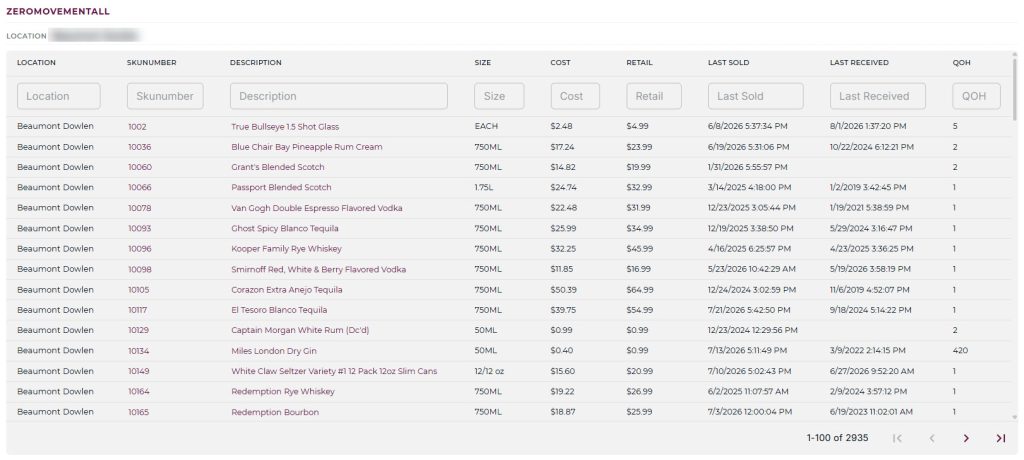
A zero movement report is the fix, and it’s boring in the best way: it tells you the last date each product sold. Run it, and the money you’ve had tied up in the back corner becomes a list you can act on — mark it down, work it into a mixed case, stop reordering it.
The same visibility matters when stock is moving. Real-time counts mean a purchase order reflects what’s actually on hand at the moment you build it, not what the system knew at last night’s close. If you run more than one location, it means a transfer moves against a real number instead of an estimate — and that the numbers still reconcile after it lands.
That’s the difference between inventory data you check and inventory data you trust.
2. Your pricing stops leaking margin
Beverage pricing is genuinely more complicated than most retail, and most systems weren’t built for it. Bottle price, case price, cash price, card price, loyalty price, mixed-case discount — a system that handles some of those forces you to give up the rest.
The place it leaks quietly is overlapping promotions. Say your standing offer is 5% off six bottles of wine, and Wine Club Wednesday runs 10% off six bottles from 3 to 7 p.m. Those two shouldn’t add up to 15%, but plenty of systems will happily do exactly that, and you’ll never see it — it looks like a normal transaction on the receipt. It should evaluate both and apply the better one. Ten percent, not fifteen.

The customer side of this is the other half. House accounts, wine clubs, gift cards, and rewards balances aren’t add-ons in this business, they’re how regulars behave. When they live in the same record as purchase history, your cashier can answer a question at the counter instead of finding you. And when a promotion can be described the way you’d say it out loud — 15% off all wine on Tuesdays — it gets used, instead of sitting unbuilt because the setup screen was too much trouble.
3. Your store stops being an island
This is the reason that has changed the most since we first wrote this post, and it’s worth being specific about what’s different.
The old answer to connecting your POS to anything else was a scheduled file transfer. It worked. It’s still available, and for some setups it’s still the right call. But it was the only answer, and that meant every connection was a project.
mPower now has an open API. Your data is accessible to the tools you choose — your own reporting, your accountant’s systems, a custom workflow somebody on your team wants to build. You’re not filing a request and waiting to find out whether it’s on a roadmap. That’s the part that matters more than any single integration on a list: what happens when you want to connect something nobody has connected yet.
Alongside it, the connections every store needs are already built:
- Accounting. Sales sync to QuickBooks Online automatically — daily summaries, tax breakdowns, and payment method splits land in your books without a manual export or a second entry.
- Payments. Three processing partners, your choice among them, your own negotiated rates, and no markup layered on top. Your processor shouldn’t be dictated by your software.
- Distributor invoicing and EDI. Vendor invoices arrive electronically instead of getting keyed in by hand, so the costs are right from the moment they land — which is also when your margins become trustworthy.
- Delivery and e-commerce. Connect the online ordering and delivery channels your customers already use, with one catalog and one set of stock levels behind them.
- FTP, still supported. If a platform you work with wants a flat item file on a schedule — description, size, department, category, price, and stock levels — that still works exactly as it always has. It’s an option now rather than the only path.
Whichever way a channel connects, you keep the same simple control over what’s out there. Flag an item Web Active and it goes online. Uncheck it and it comes down. You’re not managing a second catalog and hoping the two agree.
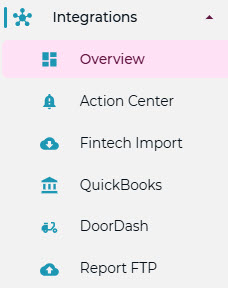
The full picture is on the integrations page, including what’s connected today and what the API opens up.
What an upgrade shouldn’t cost you
The reason owners put this off usually isn’t the software. It’s the fear of the switch — a weekend that turns into three, an item file that arrives mangled, a week of ringing things up wrong while everyone learns.
That’s a fair thing to ask about, and you should ask it of anyone you’re evaluating. Who moves the data. Who’s reachable on a Saturday in December. Whether the person who answers has heard of a case-pack-single split before.
We handle the migration, and support is U.S.-based, including nights, weekends, and holidays.
If you want to see any of this against your own numbers rather than a demo script, schedule a walkthrough or call 877-396-0141.