Opens in a new tab

Solutions · Stay Ahead of the Shelf

Never run out of the items that make your money.

An empty space on a top seller’s shelf costs more than a missed bottle. mPower puts stockout risk, expected supply and the profit at stake in one view, so you can act before the gap grows.

15+ years leading beverage retailThousands of installs46 states + DCU.S.-based team

See your second set of eyes at work

Staying ahead of the shelf takes more than knowing what’s running low.

Watch the items at risk come into focus, with the estimated gross profit lost per day and a separate view of A-tier items running low.

  1. 01See the days of supply
  2. 02Check what is covered
  3. 03Protect the top earners

How mPower helps

Top earners protected first. Dead stock surfaced before you reorder.

See which gap deserves attention first.

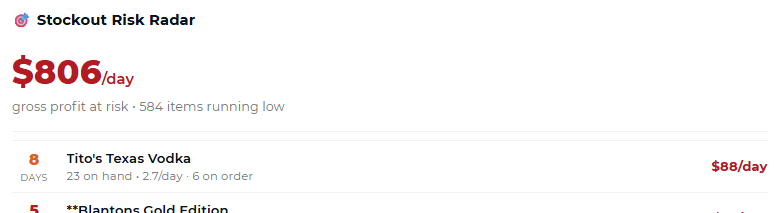
The Stockout Risk view uses sales velocity and on-hand stock to estimate days to zero. It ranks uncovered items by estimated gross profit at risk per day, so a short list tells you where to start.

See the supporting product details

Product performance and purchasing

Use profit contribution alongside selling velocity when reviewing what to replenish. The Stockout Risk view ranks its uncovered items by estimated gross profit at risk per day.
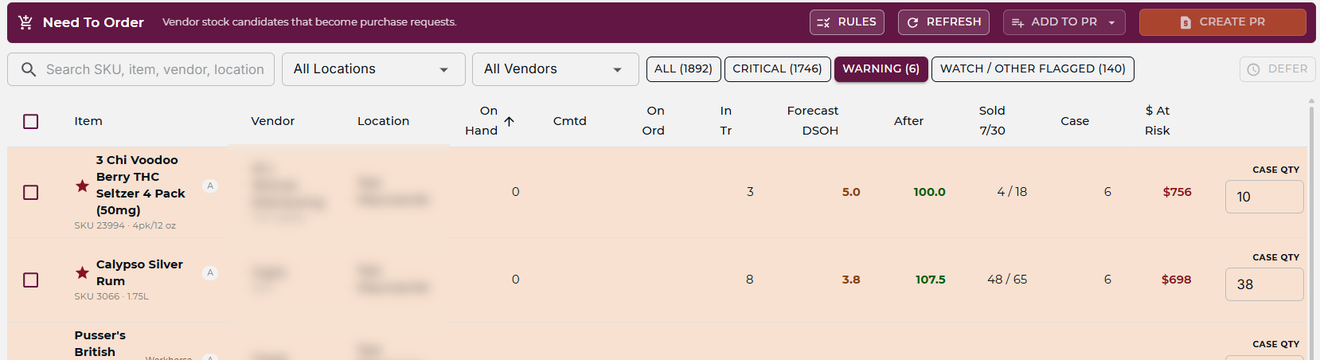
mPower Need To Order screen listing at-risk items with forecast and quantity to order

Account for stock already on order.

An item that looks low may already have enough coming. mPower checks on-order quantities when identifying stockout risk. A separate Protect the Vital Few view draws attention to A-tier earners running low.

See the supporting product details

Days of supply and expected orders

Velocity and on-hand stock show an estimated runway. On-order stock is considered when identifying which items remain at risk.

mPower Stockout Risk Radar showing days until each item hits zero and the gross profit at risk per day

Choose how to fill the gap.

Review the need alongside other locations’ stock. A recommended transfer can make use of surplus already in the business; where a vendor order is needed, build the purchase request with the quantities and stores in view.

See the supporting product details

Recommended inter-store transfers

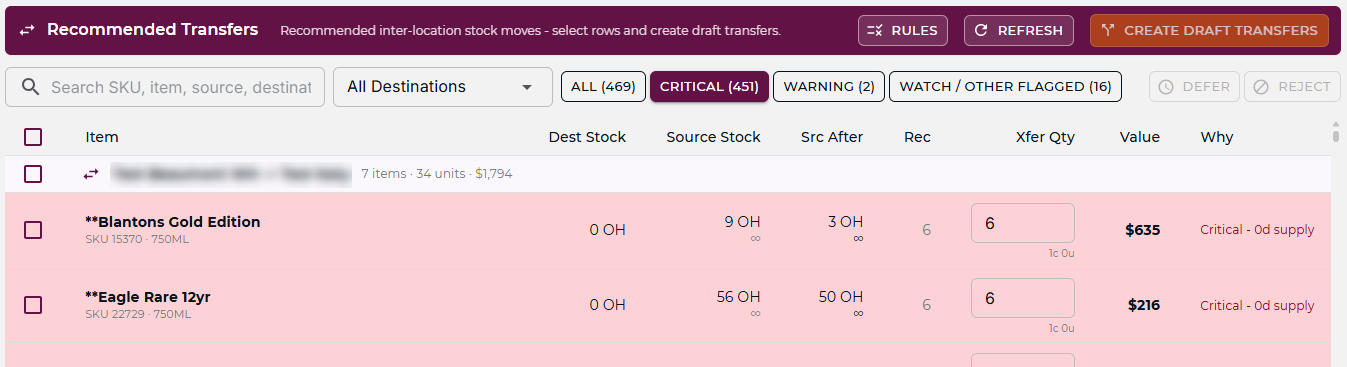
Review suggested transfers from locations with available surplus before adding more vendor stock.

mPower Recommended Transfers screen checking other locations for surplus stock before a purchase order goes out

Replenishment that reflects your stores

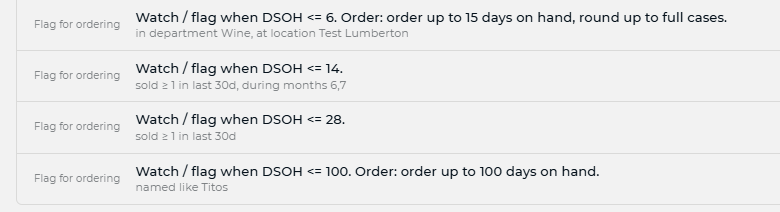
Set the replenishment conditions for the locations you manage, then review the recommended quantities in the purchase request.

mPower Need To Order rules written as plain-English sentences with days-of-supply thresholds

Reorder the right items, in the right quantities, at the right time.

The decision starts with what is running low, what it earns and what is already coming. mPower keeps those signals together so you can spend your time deciding, not assembling the picture.

From a stockout risk to available stock

Check the network before you buy more.

Once a gap is visible, the next question is where to fill it. Another store may have stock available before a vendor can deliver.

Put existing inventory back to work.

Review the transfer recommendation and the source store’s remaining supply. When a transfer makes sense, move the surplus to the store that needs it. When it does not, use the purchase request to build the vendor order.

The same decision can protect a sale in one store and release idle stock in another.

Ready to stop running out?

See reorders that stay ahead of the shelf.

A consultative walkthrough of mPower’s demand planning — with a real person who knows beverage retail.

Velocity-aware reorder points, transfer suggestions before new orders go out, and a U.S.-based team behind it.

Schedule a Demo
Two people raising bottles together against a sunset