
Ask ten POS vendors whether their system works for liquor stores and you’ll get ten yeses. Most of them are telling the truth in the narrow sense. Their software runs retail, and a liquor store is retail.
The difference shows up in the gap between what a system can technically do and what it does without a workaround. That gap is where your Saturday goes.
If you’re shopping right now, here’s where to look.
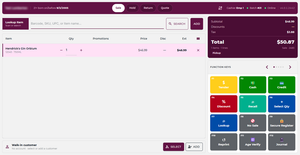
At the counter, speed and the license are the same problem
The register is the only part of the store where a mistake can cost you the business. Not slowly, through margin. Immediately, through a failed compliance check.
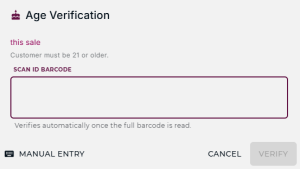
Which means the two things you’re optimizing at the counter are actually one thing. A system that verifies age by scanning the 2D barcode on a driver’s license is faster than a visual check and it removes the judgment call from the newest employee on your schedule. The date math happens the same way on a dead Tuesday and a Friday at 6pm with eight people in line. That consistency is the whole point.
The same scanner pulls up the customer record, which is the other thing the counter needs to be good at. Your regulars are most of your revenue, and a name and a phone number isn’t a customer record. What you want on screen is purchase history, store balance, a reprintable receipt from three weeks ago, and any alert you’ve attached to the account. That last field earns its keep: “charge account past due” or “prefers case pricing” showing up for whoever is working the register means the store runs on the system instead of on your memory.
Then there’s payment. If your staff rings the sale on one screen and keys the total into a separate card terminal, you’ve built two chances for error into every transaction and given yourself a reconciliation problem at close. Integrated processing means the amount moves from sale to tender automatically and the day’s card batch matches the day’s sales without anyone adding it up. mPower handles all three of these in one flow at the point of sale.
On the shelf, the number either means something or it doesn’t
There are two kinds of liquor store. One orders to the shelf. The other orders to a memory of the shelf.
The difference isn’t discipline, it’s whether the on-hand number is trustworthy enough to act on. Once staff stop believing it, they stop using it, and you’re back to walking the stockroom before every order.
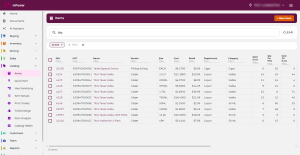
Practically, that means a system where quantity on hand and quantity on order are visible from the register, so “do you have more in the back?” is a five-second question. It means batch counts you can enter at open and close from the same screen instead of a clipboard that gets typed in later, if it gets typed in. And it means item setup, ordering, and receiving living in one place in the back office rather than three, because every handoff between systems is a place for the count to drift. That’s the practical shape of inventory management for beverage retail.
At the back door, receiving is where the hours are
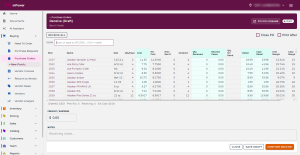
Ask any owner where the day disappears and receiving comes up before anything else. A truck arrives, and someone types two hundred line items into a computer.
The fix is that your distributor’s order arrives as a file your system can read, so the items, costs, and quantities are already populated when you open the receiving screen. mPower takes nightly wholesale order files through Fintech, and connects to the rest of your stack through our integrations.
Time saved is the obvious benefit and the smaller one. The real benefit is that costs come in accurate. Accurate costs mean accurate margins, and accurate margins mean the reports you make ordering and pricing decisions from are describing your store rather than approximating it.
In the back office, the system should hold the line for you
The last category is everything that keeps running when you’re not standing there.
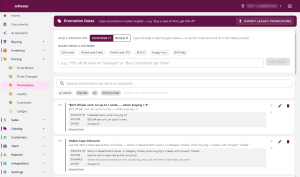
Promotions entered once apply automatically at the register, on the right items, at the right price, for the right dates. Nobody has to remember that the 6-pack deal started Monday. Managers can still discount manually or override a no-discount item, but that authority is tied to a role rather than a password everybody knows.
Gift cards and rewards run through the same system that rings the sale, so balances and point accruals land on the customer record and in your reports instead of in a second vendor’s portal you reconcile at month end.
Staff clock in through the POS, and when someone forgets, you fix the entry in the back office instead of reconstructing a week from memory. And a message you post shows up when employees log in, which is the closest thing to a shift note that actually gets read.
Compliance sits in this category too, and it’s the one that varies most by where you operate. Texas stores filing monthly through RITS and tracking TABC stickers on wholesale bottles need something different from a store in Pennsylvania. We keep that state by state, starting with Texas.
The four-question demo
Feature checklists all look the same because they’re written to look the same. So skip them. In every demo you sit through, including ours, ask the salesperson to show you live:
- Ring a mixed case.
- Scan a driver’s license.
- Receive a distributor order.
- Pull last month’s margin by category.
Software built for beverage retail does all four without leaving the room. Software built for retail in general does two of them well and moves quickly past the other two. You’ll know inside twenty minutes which one you’re looking at.
If you want to run those four questions at mPower, schedule a demo and we’ll do it on your own products and numbers. You can also see how we compare to the other systems on your list on our comparison pages, or reach sales at sales@mpowerbeverage.com or (877) 396-0141.
