
3 Reasons to Upgrade to Liquor Store POS Software
Running a business is hard. You need the right tools to be successful. These tools include products, inventory, and store hardware. Why are these tools important to the business? Products are important to cater to your customers, you need to have enough inventory for those customers, and the right hardware to get them out the door quickly.
mPower Beverage Liquor Store POS Software helps you manage your inventory efficiently so you can have enough inventory for your customers. Our POS Software is easy to use to allow your employees to get customers quickly out the door.
Why do I need Liquor Store POS Software?
1) Help Manage your $$ Flow
With mPower Beverage Liquor Store POS Software sleek inventory management, never waste storage, inventory or money! Let mPower Beverage handle (most of) it for you. We have over 70 retail reports to help you manage your inventory correctly and efficiently.
Additionally, our reporting allows you to view your inventory in real time. If you are creating a purchase order or transferring between locations, have peace of mind knowing that you are receiving the correct numeric count.
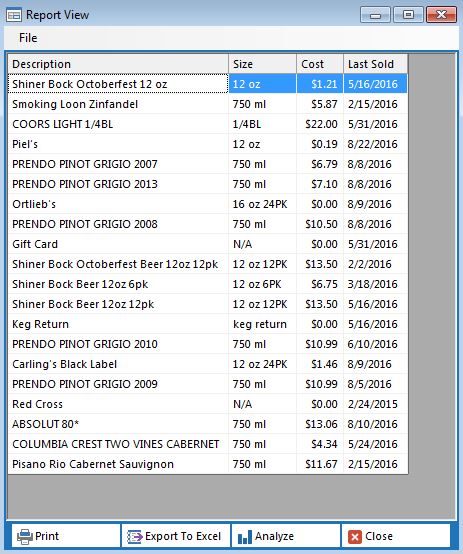
This is the “Zero Movement” report. This report shows you when the product last sold.
2) Improve your service and sales
Customer Relationship Management: With mPower Beverage Liquor Store POS Software, manage and maintain house accounts, rewards points, wine clubs, gift cards, and so much more. You will also have the ability to export customer e-mails to send out mass e-mail blasts for promotions or events.
Promotions: Manage and track your promotions in mPower Liquor Store POS Back Office. Create promotions for specific dates, times or both. The system will never stack discounts, it will only give your customers the best discount offered. For example: Your weekly discount is 5% off of 6 bottles of wine. However, during Wine Club on Wednesdays from 3 p.m. to 7 p.m. members are eligible for 10% off of 6 bottles of wine. The system will automatically give the Wine Club the 10% discount – NOT 15%.

3) Handle your e-commerce efficiently.
With the correct FTP, you can send or remove your product to your website. Under item information there is a box at the bottle of the screen that says “Web Active.” Simply check this box to send your item to the website. If you need to remove a product from the website, simply un-check the box that says “Web Active.” This will remove your item from the website until you re-check the box.

To learn more about mPower Beverage Liquor POS Software, please contact us here.
We are also available to give you an interactive, personal demo. For the personal demo call (877) 396-0141.


 Checking customers out on an old-fashioned cash register is frustrating for both business owners and customers. Today’s liquor stores require a more high-tech solution to their inventory and sales needs. Package store POS software integrated into cash registers and business computers allows all employees and owners to